Welcome to my blog! I'm Karen Belt, a Deputy Principal, working at Lynmore Primary School in Rotorua, New Zealand. In the past I have taught Years 0 - 4 and used 1:1 iPads to engage and motivate learners and improve student achievement. This blog documents my teaching and leadership journey and my learning processes with iPads in the classroom. I am a Google Certified Educator #SYD17 and I'm proud of having been a member of the inaugural Manaiakalani Digital Teaching Academy(MDTA) program and a Spark Manaiakalani Innovative Teacher (MIT) and an inaugural Manaiakalani Google Class OnAir teacher.
Showing posts with label Apple TV. Show all posts

Wednesday, 4 February 2015

Introducing the iPads ... sharing our learning via photographs

On Day 2 with my five year olds, I introduced the iPads as a tool to assist with their learning.  Having seen last year the importance of routines and careful scaffolding we started by watching the iPad safety video we created last year - a "how to" guide for using the iPads and carrying them around the school and classroom.

As with last year, we started with just the camera this year and learnt how to take a photo - it may seem "easy" but there are important learning milestones:
  • Which icon is the camera
  • How do we hold the device to safely take a photo
  • How to take just ONE photo
  • How to make sure what you want to photograph is actually in the picture
  • How to make sure the image is crisp and not blurry
After a session yesterday photographing our friends and some plastic bugs, today during maths we were able to use the iPads to create an image to share our learning about numbers.

Using a tens frame,  our class teddy bears and a number fan, learners were encouraged to show their understanding of a number.  I carefully modelled the learning a few times and we had some tries before we got the iPads out to document it.

Here, Whare is taking a photo to represent the number 5.  He has carefully counted out 5 bears and placed them on his tens frame.  He has then found the number 5 on his number fan and placed it in a way so that he is able to photograph both the teddy bears and the number.  


Photo by Whare

Its important to note that this is the first time we did this activity, and while some photos were exactly as instructed, other learners had difficulty ensuring the photo looked exactly as they wanted it to.  These photos by another learner were not as successful - in the first photo, one of the bears is not really able to be seen, and in the second, the number fan was up the wrong way and the number displayed in the photo was of a 0 (rather than the 2 which is on the other end of the fan). 


Using the Apple TV we were able to look at a selection of photos and talk about how we can improve when we attempt the same activity tomorrow.  Importantly, through revisiting, the learners were able to see the differences and I expect this to be reflected in their photographs tomorrow - after all, this is only Day 3 and they are all very new to school.


Wednesday, 26 November 2014

My First Year in Review

As part of our final weeks of our MDTA PLG we were asked to create a video as a summary of our year.  I found it difficult to condense what I wanted to share into just five minutes and when I look back over my year am amazed at what I've packed into such a relatively short time.

I feel I have grown as a teacher and am definitely looking forward to the challenge of my own class next year.  I will definitely enjoy my last few weeks with Class 20 of 2014, and look forward to being able to watch these lovely young learners grow as they move into 2015 and beyond.


Monday, 17 November 2014

Finding a way ... thinking outside the square!

Learners in Class 20 have been really enthusiastic about using ScratchJr since we had Class 12 visit and show us how it works (and they've created some AMAZING animations!)

Today we created animations from our school-wide athletics day using ScratchJr, as a way of showing which events we enjoyed the most!

We shared many of the examples to the Apple TV and peers really enjoyed seeing what others had created!  One of my learners really wanted to share his great animations with his Dad - can you please put it on the blog Mrs Belt?  Great that they use our class blog and understand they can use this to show their whanau what we've been doing in class!   But .... there is currently no function for sharing to either our blog or as a video file to the learners Google Accounts (although the ScratchJr website says this feature is "coming" - we can't wait!)  How to explain that one to a five year old that was so proud of what he'd created and really wanted to share?

I wondered if I could find a way?  Thinking outside the square tonight,  I was delighted to make this post on our class blog!  I used a screen casting program to airplay the screen of the learners iPad to my MacBook and then used Quicktime to take a screen recording of the animation - yes, its not ideal and a little more time consuming than just pushing an embed button, but its enabled me to capture this learners animation and share it on our blog as well as share an example of the animations that are being created by my learners!


NB:  There is no sound on this animation

Tuesday, 4 November 2014

Learning from older peers

Today we had Year 3/4 learners come to our classroom to share what they'd been learning and teach our students how to use the ScratchJr app.  It was great to see the absolute engagement of both my learners and their older 'teachers' for 90 minutes this morning.


The Year 3/4 learners were very adept at using the app and were confident and articulate in sharing their knowledge with my 5 year olds.  I buddied two of my learners with one 'expert' and circulated the groups to listen to the conversations and observe the modelling which was occurring.  The older students were able to scaffold the activity and support their younger peers to ensure they all completed an amazing animation!  It was great to hear and see the older learners demonstrating and then watching and guiding as the younger learners tried things out with patience and a supportive attitude!


We concluded the lesson using our Apple TV where learners were able to showcase what they had created as a result of today's learning.  The older learners were also keen to share which gave us some great ideas for using the app in the future.


For me, this session reinforced the importance of removing the traditional teacher/learner barriers and thinking outside the square about how to convey knowledge.  Sure, I could have taught my learners how to use this app quite successfully, but the success of the peer teaching goes deeper than that.  The Year 3/4 students had to scaffold their approach to suit my younger learners, which they did with amazing success.  They were able to reinforce their own learning through teaching others and see others create as a result of this teaching.  Ultimately, the Learn-Create-Share framework which is the backbone of our school philosophy was highlighted today, not through blogging or something visual, but through sharing their knowledge with others in the school, which in turn enables them to Create to demonstrate their own Learning - and so the cycle continues!

Tuesday, 22 July 2014

QR SUCCESS and some tweaks :)

Yesterday afternoon we discussed QR codes and how they worked.  Using the Apple TV we used just one of the codes for our Commonwealth website (New Zealand) and I modelled how to scan the code to bring up the webpage.  After having a brief look at that page as a whole class on the Apple TV, all students had a go reading the QR code and exploring the page on their individual device.

Today, was an opportunity for the learners to explore the rest of the site, using their iPads to select a QR code from our topic wall.


The enthusiasm and engagement both Michelle and I observed in the learners over the 45 minute session was amazing!  Not only were they keen to use the QR Reader, but they had the opportunity to choose which code they scanned.  In giving the learners this choice, it was interesting to see the selections that were made - some learners made their choice based on the images around the code, while others randomly selected a code.  Others were influenced by what their peers had scanned with several learners coming back to the topic board to be shown which code to scan.  Importantly, the learners were equally as engaged when they were interacting with the material on the webpages as when they were scanning the codes!

As with anything tried for the first time, there were a few things that needed to be tweaked!  One of the codes didn't work - I'd blue tacked the codes to the wall so it was easy to take that code down until I could replace it tomorrow.  I also discovered that the Explain Everything projects embedded onto the bottom of the pages were not able to be downloaded (despite testing)!  After some thought I've circumvented this problem by creating QR codes that link learners directly to the projects in Google Drive - these codes will be blue so they are easily recognisable and we can have learners scan the blue codes when we are ready for them to complete these activities!

I think I was the most unpopular teacher at Pt England School this afternoon when I told the learners they had to pack up for the day - just as well we have a whole term to explore!  Based on today, QR codes are here to stay in Class 20!


Our Commonwealth Site was created using Google Sites.  We are using QR Code Reader by Scan, Inc on our iPads.  I used QR Code Generator to create out QR codes.

Saturday, 28 June 2014

Subtraction .... with Explain Everything!

One of the many things I find so amazing about the Explain Everything app is you can do so much with it - limited only by the ability to "dream up" ideas!  We've moved onto subtraction in maths and last weekend I was trying to come up with something more engaging that writing problems on the board or taking three bears away from five bears.  Hoping for inspiration I grabbed a coffee and some cookies to inspire me ... and another Explain Everything project was born!  What if I had five cookies and Cookie Monster stole two of them?  How many would I have left?

I created a multi slide project with the first slide containing both the visuals and an audio explanation of how to complete each slide.  We watched this slide as a whole class at the beginning of the first lesson and then completed some of the follow up equations, again as a whole class - having the iPad airplay to the Apple TV ensured everyone could see! The rewindable nature of the "teaching" slide ensured students could go back to this during the week.


Oh, and after students master subtraction from 5, what comes next?  Fish of course!


Friday, 7 March 2014

Our first visitors ....

This week we had our first outside visitors to the classroom (visitors are a regular occurrence at Pt England).  The visitors were particularly keen to capture our iPad instructions display, where we have step by step visual instructions for our learners for each app that we introduce.  During today's visit we had students on KidPix on the eMacs, students completing reading activities on Explain Everything, and two guided reading sessions with the teachers using the PM eCollection.  We also had some students taking a photo of their reading activity and using AirPlay to display this on the class TV.


Thursday, 27 February 2014

Today during reading, two students were reading our horse story from a few weeks ago (which is displayed in the classroom).  This was independent of the teacher, after they had finished their assigned activity.  They recorded each other and Nature had the forethought to swap iPads with Deborah so that her video was on her own iPad!  It was great to see them independently thinking about recording what they were doing and they were so keen to share with both Michelle and I as soon as they had finished and have it displayed on the Apple TV for the rest of the class to see.  We made sure we viewed it and were extremely keen to demonstrate to the students that we really liked what they had done!  


This instance really shows how confident the students are getting with the iPads and how they have an expectation of recording all their learning, all the time!  We also had a new child enter the class today (Phoenix) and she was extremely keen to use an iPad - we need to try and have these ready if we know new students are coming!


Tuesday, 4 February 2014

Scaffolding for our students


Revisiting the photos that the students took yesterday was a great inspiration for our writing lesson today!  Students recognised the pictures of the digger they had taken and Ms George modelled writing about this experience today.  

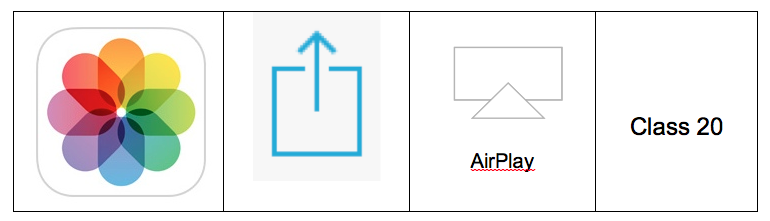
Many students have quickly grasped how to AirPlay their iPads to the Apple TV to view their photos, but for students that need additional scaffolding we have produced a table which shows the icons for the 4 steps which are required.  We trialled using this visual key today with the students and it was extremely successful and is something we will look at repeating for different operations we introduce to the students.  This is a great example of refinement after we had tried something the day before, and discussed how we could make it even easier for the students to grasp the “how to”.


To reinforce the learning from our first day, we again used the iPads to photograph our learning, this time in the maths area.  Students selected a number (up to 9) and assembled counters/bears/bugs to represent that number.  They then used the iPad to record their learning and shared this with others via the Apple TV.

Monday, 3 February 2014

iPads on Day One

Five students on day one, and day one of the trial! Our iPads are still to arrive but we were keen to implement them into the class routine from day 1! Exploring the Pt England School grounds was a great opportunity to document our learning using photos! We were able to share these on the Apple TV later in the day and will revisit the photos taken by the students tomorrow during writing time. 

What we discovered today: We need to have more than 1 copy of our icon wall display - while having it on the wall is great for students to refer to, during the initial teaching of the tool it is helpful to have a copy at the teaching station to refer to! 

What worked well: Having a device for each child. Modelling using an iPad and setting boundaries for taking the iPads out of the classroom. Students having the freedom to capture their favourites and sharing their images with the class. Opportunities to discuss the images with students.