Welcome to my blog! I'm Karen Belt, a Deputy Principal, working at Lynmore Primary School in Rotorua, New Zealand. In the past I have taught Years 0 - 4 and used 1:1 iPads to engage and motivate learners and improve student achievement. This blog documents my teaching and leadership journey and my learning processes with iPads in the classroom. I am a Google Certified Educator #SYD17 and I'm proud of having been a member of the inaugural Manaiakalani Digital Teaching Academy(MDTA) program and a Spark Manaiakalani Innovative Teacher (MIT) and an inaugural Manaiakalani Google Class OnAir teacher.
Showing posts with label instructions. Show all posts

Tuesday, 8 July 2014

The year is half over ....

I've been a teacher for six months!  WOW!  Sometimes I still find it hard to believe I'm living my dream!  I was walking through school the other day when one of my colleagues said "have you really only been here six months ... it seems like forever!"  What an amazing compliment that is!


As I sit down and reflect on my first six months teaching and in particular the last term .. I think about the progress the learners in my class have made and also think about all the learning I've done so far this year. There IS a difference between the "theory" of learning while at University (and even to a degree on placement) and the "doing" of being in your own classroom.  Some things can be taught, others you need to find out through experience!

I remember vividly the first day Michelle was not in the class at all (due to a Manaiakalani meeting off site) and feeling really nervous.  I compare that with how I'm feeling now (just a few months later) when she's off site due to illness or meetings and how much confidence I now have - what a difference a few months make!

Sharing a classroom continues to be an amazing experience - Michelle is supportive of me trying new things even if she has had limited success with them herself in the past and I can't thank her enough for that!  Having an "expert" to ask advice of and learn from is SO beneficial and I feel I'm growing as a teacher so much faster as a result.

We recently had parent interviews and this was an amazing experience.  We were able to share samples of the work learners have been doing in the classroom as well as introduce the Parent Portal (a feature of Hapara Teacher Dashboard)!

I can't say I feel "in control" of my University study - I am definitely struggling to find a balance with working in the classroom as well as finding time for readings and assignments, but I am definitely learning, which has to be a good thing.  The Manaiakalani Digital Teacher Academy (MDTA) sessions continue to be amazing!  Sharing experiences and learning with this great cohort of teachers is so worthwhile, as are the digital immersion sessions we complete together - I totally LOVE iMovie, on which our learning has been focused for the last few weeks (and am actually enjoying putting together our Team 1 movie for Day 1 assembly next term!)

As I head into the holidays I have a few things on my "to do list", including something exciting to try with the class next term (watch this space!) but it is also a time to reflect on what has worked well, and not so well in my first six months of teaching.  In random order .....

  1. Don't be scared to try things ... and have them fail ... you can learn from things even if they don't work the first time! 
  2. Scaffold new activities really well - if possible create visuals to support the scaffolding.
  3. Set routines and be consistent - ensure new students understand the routines!  
  4. Reinforce the positive - an oldie but a goody - it REALLY works!
  5. Relationships are key - know your students and their whanau.
  6. Explain Everything IS amazing ... and limited only by your imagination!
I am enjoying the break and a chance to recharge my batteries, but I also can't wait to get back to, what for me is, the best job in the world!

Monday, 24 February 2014

A New App ... Explain Everything!


Today we used the Explain Everything (EE) app for the first time - and did some learning along the way!  We had the initial instructions completed to get into the App and create a new document, but didn’t have these printed so we used my computer to show these to the students (and refine the instructions as we went).  This really reinforced the need to keep these steps ‘simple’ with a picture for each step.  

All students managed to access the app and create a file, taking a photo and adding either pen or voice - the instructions worked really well!  To us, this reinforced the importance of having them, and also in introducing only one app at a time - we may have tried to “rush ahead” with apps if the iPads had been ready and available on the first day, so this delay has actually been a benefit in reinforcing the need to slowly introduce new things.

Tuesday, 4 February 2014

Scaffolding for our students


Revisiting the photos that the students took yesterday was a great inspiration for our writing lesson today!  Students recognised the pictures of the digger they had taken and Ms George modelled writing about this experience today.  

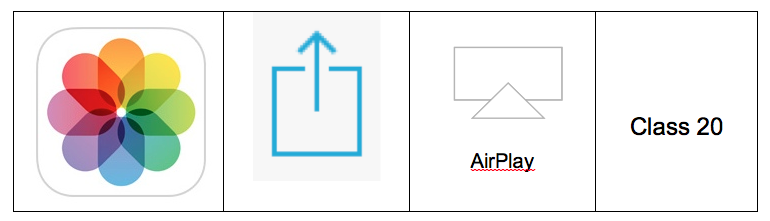
Many students have quickly grasped how to AirPlay their iPads to the Apple TV to view their photos, but for students that need additional scaffolding we have produced a table which shows the icons for the 4 steps which are required.  We trialled using this visual key today with the students and it was extremely successful and is something we will look at repeating for different operations we introduce to the students.  This is a great example of refinement after we had tried something the day before, and discussed how we could make it even easier for the students to grasp the “how to”.


To reinforce the learning from our first day, we again used the iPads to photograph our learning, this time in the maths area.  Students selected a number (up to 9) and assembled counters/bears/bugs to represent that number.  They then used the iPad to record their learning and shared this with others via the Apple TV.